How VoyageIQ Uses RAG Grounding to Keep AI Answers Grounded
When you ask a large language model a question about a niche topic or your own private documents, it doesn’t automatically have access to that information. If the required context isn’t available, the model may generate a plausible-sounding answer based on patterns learned during training rather than information from your documents.
For an application like VoyageIQ, an AI tourist assistant that works with specific travel guidebooks that can be a serious problem. If a user asks about a particular museum, attraction, route, or hidden hiking trail, an unsupported answer reduces the usefulness of the application.
This is where RAG grounding becomes important.
In this second part of our VoyageIQ series, we’ll look at how RAG grounding works and how VoyageIQ uses document chunking, embeddings, vector search, and Gemini to provide relevant source context before generating an answer.
🚫 The Problem: Why LLMs Need External Context
Large language models are trained to generate useful responses based on patterns learned from their training data. They aren’t databases that automatically know the contents of your private documents.
When the required information isn’t available, a model can sometimes produce an answer that sounds convincing but isn’t supported by your source material.
This raises an important question:
How do you prevent AI hallucinations with RAG?
The answer starts by separating knowledge retrieval from language generation.
Instead of expecting the model to already know every travel guide, VoyageIQ retrieves relevant information from uploaded documents at runtime and provides that information as context to the model.
Think of it as giving the AI an open-book test.
📥 Step 1: Document Ingestion and Chunking
Before an AI application can search a document, the document needs to be processed into smaller pieces that can be searched efficiently.
In VoyageIQ, the ingestion pipeline handles this in several stages:
- Extraction: The backend extracts text from uploaded PDF guidebooks or accepts plain text content.
- Chunking: The extracted text is divided into smaller chunks so individual sections can be retrieved independently.
- Embedding Generation: Each chunk is converted into an embedding—a numerical representation of its semantic meaning.
The result is a collection of searchable pieces of the original document rather than one large block of text.
This is an important part of the RAG pipeline with embeddings and vector search.
Instead of sending an entire guidebook to Gemini for every question, the application can first identify the sections that are most relevant to the user’s query.
🔍 Step 2: Vector Search with pgvector
Once the document chunks are converted into embeddings, VoyageIQ stores them in Supabase PostgreSQL using the pgvector extension.
When a user asks a question such as:
“Where can I find family-friendly outdoor activities in the old town?”
the backend follows a retrieval process:
- The user’s question is converted into an embedding.
- The query embedding is compared with the stored document vectors.
- The most relevant chunks are retrieved based on semantic similarity.
This is where vector search becomes useful.
A user doesn’t have to use the exact words found in the source document. For example, the user might ask about “things to do with kids outdoors” while the guidebook describes “family-friendly outdoor activities.”
Semantic search can connect those related concepts.
This approach is also why RAG with pgvector and Gemini can be useful for document-based AI applications: pgvector handles the similarity search while Gemini handles the language understanding and response generation.
🛡️ Step 3: RAG Grounding
Retrieving relevant chunks is only part of the process.
The next challenge is making sure the language model actually uses the retrieved information when generating its response.
VoyageIQ passes the retrieved context to Google Gemini along with instructions to answer using that information.
Conceptually, the prompt looks like this:
System Prompt: You are VoyageIQ, a helpful local guide. Answer the user’s question using the provided context chunks below. If the answer cannot be found in the context, explicitly state that the information cannot be found in the uploaded guides. Do not invent facts.
Context: [Retrieved Chunks from pgvector]
User Question: [User’s Query]
This is the core idea behind RAG grounding: retrieve relevant information first, then give that information to the LLM as context for generating the answer.
So rather than relying entirely on the model’s training data, the application gives it a relevant section of the user’s own documents.
🔄 How RAG Grounding Helps Reduce Hallucinations
RAG doesn’t guarantee that every AI-generated answer will be correct.
Instead, it gives the model additional source context and allows the application to constrain responses around that context.
This is why how to ground LLM responses with vector search is an important concept when building RAG applications.
The overall flow looks like this:
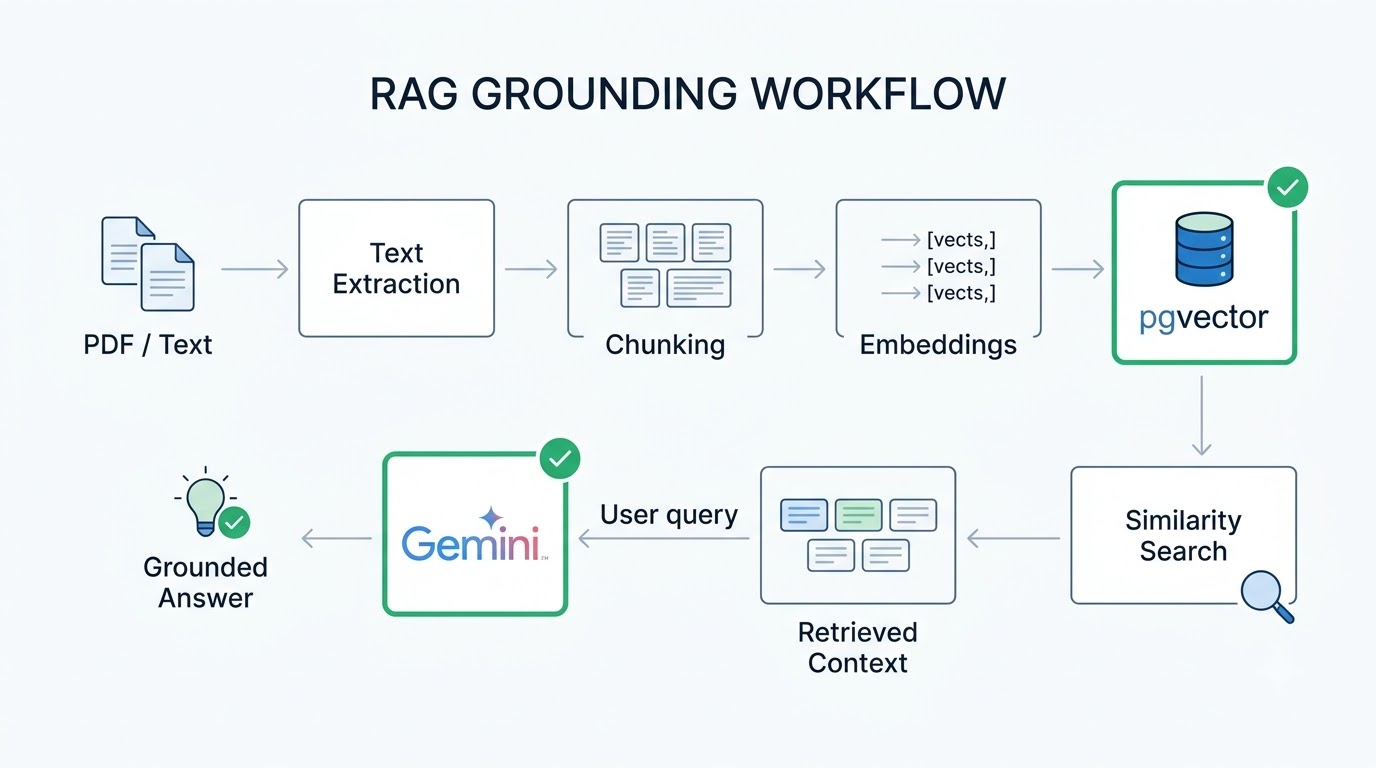
Document → Chunking → Embeddings → pgvector → Similarity Search → Retrieved Context → Gemini → Answer
If the retrieved context contains the information needed to answer the question, Gemini can use it to generate a natural response.
If the required information isn’t present, the application can instruct the model to acknowledge that rather than confidently inventing an answer.
🧩 Why Retrieval Quality Matters
Grounding isn’t just about writing a strict system prompt.
If the retrieval step returns irrelevant chunks, even a carefully designed prompt won’t give the model useful information.
This means several parts of the RAG pipeline matter:
- How documents are extracted
- How they are divided into chunks
- How embeddings are generated
- How similarity search is performed
- How many chunks are retrieved
- How the retrieved context is presented to the LLM
In other words, good RAG grounding starts before the LLM receives the prompt.
The quality of the retrieved context directly affects the quality of the generated response.
🏁 The Complete VoyageIQ RAG Flow
At a high level, VoyageIQ’s RAG pipeline looks like this:
PDF / Text → Text Extraction → Chunking → Embeddings → pgvector → Similarity Search → Relevant Context → Gemini → Answer
The LLM is still responsible for understanding the question and generating a natural response.
The difference is that the application retrieves relevant information from the user’s uploaded documents and provides that information as context.
That’s the core idea behind RAG grounding.
🚀 Try VoyageIQ
You can try the live VoyageIQ application here: https://voyageiq-frontend.vercel.app/
VoyageIQ lets users upload travel information and ask questions using an AI assistant grounded in that content.
💻 Open-Source Code
The VoyageIQ source code is available on GitHub:
- 🖥️ Frontend: https://github.com/azeemuddinn/voyageiq-frontend
- ⚙️ Backend: https://github.com/azeemuddinn/voyageiq-backend
🏁 What’s Next?
We’ve covered how VoyageIQ processes documents, creates embeddings, performs vector search, and uses retrieved context for RAG grounding.
But building the retrieval pipeline is only one part of creating a usable AI application.
In the final post of this VoyageIQ series, we’ll look at the engineering challenges around AI response latency, backend cold starts, loading states, error handling, and the UX decisions needed to make an AI application feel responsive.
If you’re building a RAG application, understanding retrieval is only the beginning. The next challenge is making the entire system work reliably for real users.
Have a question about RAG, vector search, or AI application development?
Get in touch through the Contact page