Building a RAG Application with Next.js, FastAPI and pgvector
Many AI applications start with a simple chatbot: build a UI, connect an LLM API, and let users ask questions.
That works well for experimentation. But when an application needs to answer questions based on a specific set of documents, simply calling an LLM isn’t enough.
That is why I built VoyageIQ, a full-stack AI tourist assistant that uses Retrieval-Augmented Generation (RAG) to answer questions based on uploaded travel documents.
In this post, I’ll walk through building a RAG application using Next.js, FastAPI, Supabase, pgvector, and Google Gemini, including the architecture, data flow, document processing, retrieval, and deployment.
What Is a RAG Application?
Retrieval-Augmented Generation combines information retrieval with an LLM.
Instead of sending a question directly to an AI model:
User Question
      ↓
     LLM
      ↓
   Answer
a RAG application first searches a knowledge base for relevant information:
User Question
      ↓
Vector Search
      ↓
Relevant Documents
      ↓
LLM + Retrieved Context
      ↓
Answer
This approach allows an application to provide the model with information from a specific knowledge base.
For VoyageIQ, that knowledge base consists of travel guidebooks and other information provided by the user.
Why Build a RAG Application?
General-purpose LLMs are powerful, but they have limitations when working with application-specific information.
Two common problems are:
1. The model may not know the information
A user’s private documents aren’t part of the model’s general training data.
2. The model can generate information that isn’t in the source
Even when an LLM knows something related to a question, it can sometimes produce an answer that isn’t supported by the available documents.
RAG doesn’t completely eliminate hallucinations, but it provides a mechanism for retrieving relevant information and giving that information to the model as context.
That makes RAG particularly useful for applications that need to work with private, domain-specific or frequently changing information.
Building a Full-Stack RAG Application
For VoyageIQ, I wanted to keep the architecture simple and modular.
The application consists of:
- Next.js for the frontend
- FastAPI for the backend API
- Supabase PostgreSQL for data storage
- pgvector for vector similarity search
- Google Gemini for AI generation
- Vercel for frontend deployment
- Render for backend deployment
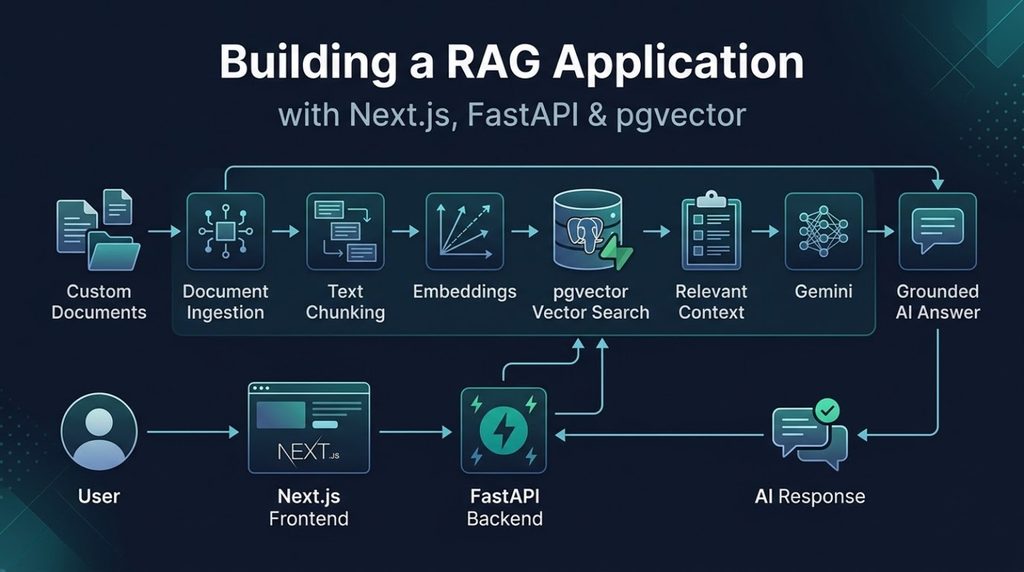
The high-level architecture looks like this:
                    User
                      │
                      ▼
              Next.js Frontend
                      │
                  REST API
                      │
                      ▼
               FastAPI Backend
                  │        │
                  │        └──────────► Google Gemini
                  │
                  ▼
             Supabase
             PostgreSQL
                  │
               pgvector
Separating the frontend and backend allowed me to keep the AI and data-processing logic independent from the user interface.
Building a RAG Application with Next.js and FastAPI
The frontend is responsible for the user experience.
Users can upload documents, provide text, and interact with the AI assistant through a chat interface.
The Next.js application communicates with the FastAPI backend through REST APIs.
FastAPI handles the application logic, including:
- Receiving documents
- Processing text
- Creating embeddings
- Searching the vector database
- Preparing context for the LLM
- Generating responses
This separation also makes it easier to change or extend the AI backend without rebuilding the entire frontend.
Document Ingestion
The first important stage of the RAG pipeline is getting useful information into the knowledge base.
VoyageIQ allows users to upload PDF guidebooks or provide text directly.
The simplified pipeline is:
PDF / Text
    ↓
Extract Text
    ↓
Split into Chunks
    ↓
Generate Embeddings
    ↓
Store in pgvector
Documents need to be broken into smaller sections because sending an entire large document to the model for every question isn’t practical.
The resulting chunks become the units that the retrieval system searches when a user asks a question.
Using pgvector for RAG
One of the key components when building a RAG application with pgvector is converting text into embeddings.
An embedding represents text as a numerical vector.
This allows the system to compare the semantic similarity between a user’s question and stored document chunks.
For example, a user might ask:
“Where can I take children for a fun day?”
The system doesn’t need the document to contain those exact words.
Instead, the embedding search can identify document sections that are semantically related to the question.
The relevant chunks are then retrieved and passed to the LLM.
The RAG Query Flow
When a user asks a question, VoyageIQ follows a retrieval and generation process.
User Question
      ↓
Create Query Embedding
      ↓
Search pgvector
      ↓
Retrieve Relevant Chunks
      ↓
Build Prompt with Context
      ↓
Send to Gemini
      ↓
Generate Response
This is the core of the RAG application.
The LLM isn’t responsible for finding the information itself. The application retrieves relevant information first and then provides that information to the model.
Grounding the AI Response
An important design goal for VoyageIQ was to keep responses grounded in the available knowledge.
The retrieved document content is included in the generation context, and the model is instructed to answer using that information.
However, an important lesson from building a full-stack RAG application is that RAG isn’t a magic solution to hallucinations.
There are several points where things can go wrong:
- The document may not contain the answer.
- The wrong chunks may be retrieved.
- The retrieved context may be incomplete.
- The model may misinterpret the context.
- Poor chunking can reduce retrieval quality.
This means the quality of a RAG application depends on much more than the LLM.
Retrieval quality, data quality, application logic and prompting all matter.
Building the User Experience Around AI
The AI model is only one part of the application.
A real application also needs to handle the time it takes for AI operations to complete.
VoyageIQ includes several UI states around these operations:
- Document processing
- Chat processing
- Loading states
- Backend connection status
- Mobile navigation
- Light and dark themes
One example is the backend health indicator.
Because the FastAPI backend runs on cloud infrastructure that can experience cold starts, the first request after inactivity may take longer.
Instead of leaving the user wondering whether the application is broken, the frontend communicates the backend state and handles the wake-up period.
This was a useful reminder that AI application engineering isn’t just about the AI model.
Deployment
VoyageIQ uses separate deployment environments for the frontend and backend.
Frontend
The Next.js application is deployed on Vercel.
Backend
The FastAPI application is deployed on Render.
Database
Supabase provides PostgreSQL and pgvector for storing the application’s data and vector representations.
The deployment architecture is therefore:
Vercel
  │
  │
  ▼
Next.js
  │
  │ API Requests
  ▼
Render
  │
  ├── FastAPI
  │
  ├── Document Processing
  └── Gemini
       │
       ▼
   Supabase
   PostgreSQL
   pgvector
This keeps each major component relatively independent and makes the system easier to develop and deploy.
What I Learned from Building VoyageIQ
Building VoyageIQ was useful because it moved the project beyond simply experimenting with an LLM API.
The biggest lesson was that building a RAG application is as much an engineering problem as an AI problem.
The LLM is only one component.
A complete system also needs:
- Document ingestion
- Embedding generation
- Vector search
- Context retrieval
- Prompt design
- API architecture
- Database design
- Error handling
- Loading states
- Deployment
- User experience
The interesting part is putting all of these pieces together into something that people can actually use.
What’s Next?
VoyageIQ gave me a practical foundation for working with Retrieval-Augmented Generation.
In the next article, I’ll go deeper into the RAG pipeline itself ,including document chunking, embeddings, vector search and grounding, and some of the challenges involved in getting the retrieval layer to return useful context.
Explore VoyageIQ
VoyageIQ is open source.
Frontend: https://github.com/azeemuddinn/voyageiq-frontend
Backend: https://github.com/azeemuddinn/voyageiq-backend
If you’re interested in how to build a RAG application with FastAPI, how to build a RAG application with pgvector, or how to build a full-stack RAG application, the complete project provides a practical example of putting these technologies together.
Building something similar or want to chat about full-stack RAG architectures? Get in touch with us through our Contact page.