
5 Practical AI Application Development Lessons from VoyageIQ
AI application development involves much more than connecting an AI model to a frontend and getting a response.
AI application development starts relatively straightforwardly when you’re building a local prototype. You can have a Next.js frontend talking to a FastAPI backend, performing vector searches, and generating responses with Google Gemini in a short amount of time.
The harder part starts when you put that application in front of real users.
Now you have to think about backend cold starts, network latency, loading states, API failures, invalid documents, database errors, and what the user sees when something goes wrong.
In this final part of the VoyageIQ series, we’ll look beyond the RAG pipeline and explore the practical challenges of AI application development, including what it takes to turn an AI prototype into a more reliable web application.
📚 The VoyageIQ Series
This is the final part of the VoyageIQ series. If you haven’t read the earlier posts, start here:
Building a RAG Application with Next.js, FastAPI & pgvector
https://codedbyazm.com/building-a-rag-application-nextjs-fastapi-pgvector
How VoyageIQ Uses RAG Grounding to Keep AI Answers Grounded
https://codedbyazm.com/rag-grounding-ai-answers/
From AI Demo to Real Product: Engineering Lessons from VoyageIQ
You’re here.
❄️ 1. Managing Backend Cold Starts
VoyageIQ uses a FastAPI backend deployed separately from the Next.js frontend.
When a backend is hosted on infrastructure that can scale down or suspend inactive instances, the first request after a period of inactivity can take longer than subsequent requests.
The Problem
A user can open VoyageIQ, submit a question, and encounter a noticeable delay before the backend is ready to process the request.
From the user’s perspective, it can look like nothing is happening.
The problem isn’t necessarily the AI model. The backend itself may still be starting, loading dependencies, or establishing connections.
The Solution
One useful pattern is to expose a lightweight health endpoint such as:
GET /health
The frontend can use this endpoint to determine whether the backend is reachable before the user starts an AI operation.
Instead of leaving the user wondering whether the application is working, the UI can communicate what’s happening:
“Waking up AI backend…”
This is a small UX improvement, but it makes infrastructure behavior visible to the user.
The broader lesson is simple:
Infrastructure delays become UX problems when users cannot see what is happening.
⏳ 2. Designing UX Around AI Latency
Traditional web applications often return results quickly enough that a simple loading spinner is sufficient. In AI application development, however, requests can involve multiple processing steps and noticeably longer response times.
AI applications are different.
A single request can involve multiple operations:
User Query → Embedding → Vector Search → Context Preparation → Gemini → Response
Each step can introduce latency.
If the interface simply stops responding while this happens, users may assume the application is broken.
Multi-Stage Loading States
Instead of showing an unexplained spinner, an AI application can communicate meaningful progress.
For example:
Searching guidebooks…
Analyzing relevant context…
Generating response…
These messages don’t make the underlying operation faster, but they make the waiting experience clearer.
Streaming Responses
Another useful technique is response streaming.
Instead of waiting for the complete generated response before displaying anything, the application can show the response progressively as it becomes available.
This reduces perceived waiting time and makes the interaction feel more responsive.
The important distinction is:
Performance isn’t only about reducing actual latency. It’s also about reducing perceived latency.
🛡️ 3. Handling Failures Gracefully
AI applications have more failure points than a typical CRUD application.
For VoyageIQ, failures can occur at different stages of the pipeline.
For example:
- A PDF may contain little or no extractable text.
- Document processing may fail.
- An embedding request may fail or be rate-limited.
- The database or vector search may be unavailable.
- A query may not have relevant matching content.
- The Gemini request may fail or time out.
A good user experience shouldn’t expose internal exceptions or stack traces.
Instead, each stage should have a predictable failure state.
For example:
Document processing fails
→ Tell the user that the document couldn’t be processed.
No relevant chunks are retrieved
→ Tell the user that the uploaded guides don’t contain enough information to answer the question.
AI generation fails
→ Show a clear retry message rather than leaving the interface stuck in a loading state.
This is where defensive engineering becomes particularly important.
An AI pipeline should not be treated as one large operation. Each stage needs to have clear success, failure, and fallback behavior.
🔌 4. Keeping the Next.js and FastAPI Layers Clean
VoyageIQ separates the frontend and backend into two repositories:
- Next.js frontend
- FastAPI backend
That separation makes the API contract particularly important.
The frontend needs to know what the backend expects and what it can return.
FastAPI’s Pydantic models provide structured validation for incoming requests, while the Next.js application can maintain corresponding TypeScript types for the client-side data.
For example, an AI query might conceptually contain:
{
  "question": "What are the best outdoor activities?"
}
The backend is then responsible for validating the request, performing retrieval, preparing the context, and generating the response.
Keeping these responsibilities separated makes the system easier to reason about and debug.
Environment Configuration
Deployment introduces another layer of complexity.
Secrets and environment-specific configuration need to remain outside the source code.
For VoyageIQ, this includes values such as:
- Supabase connection details
- Gemini API credentials
- Backend URLs
- Frontend environment configuration
The exact configuration differs between local development and deployment environments, so keeping these values in environment variables is essential.
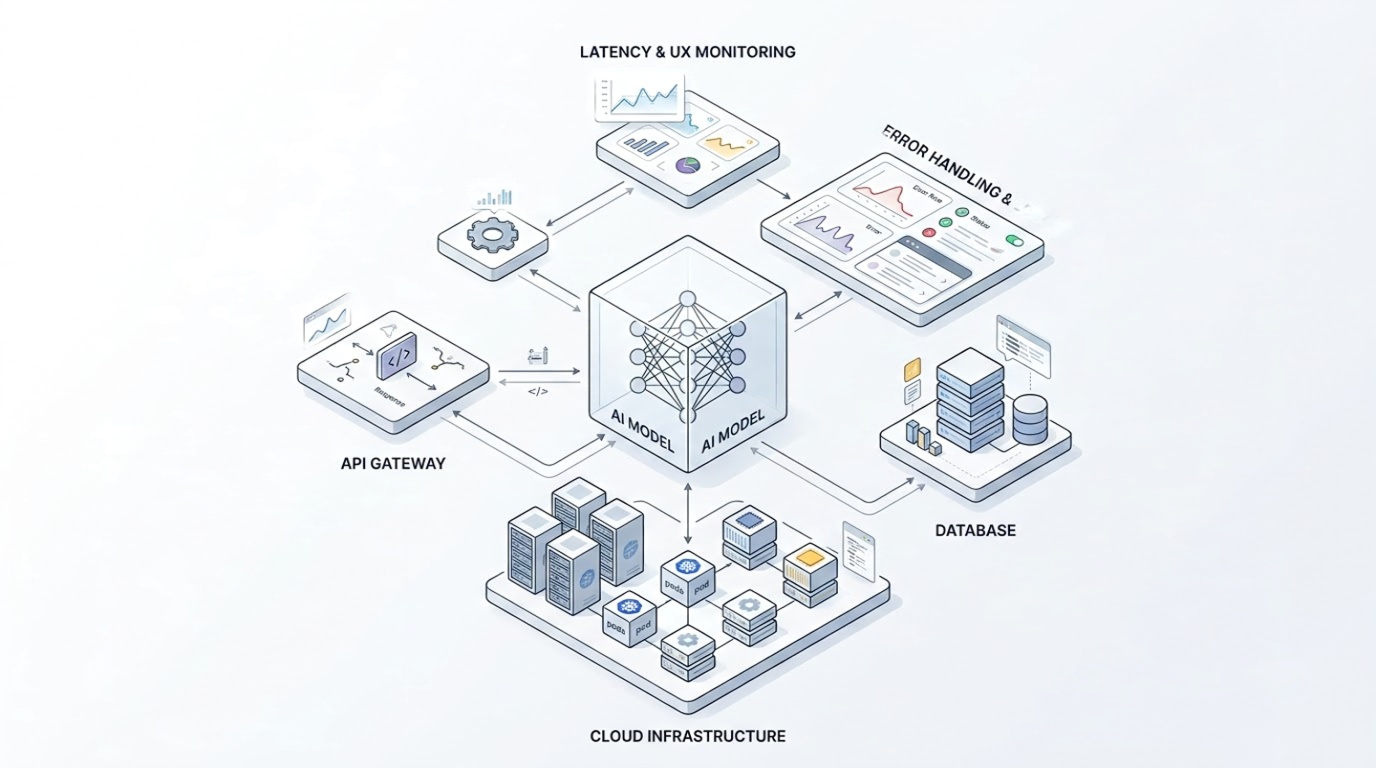
🧩 5. The AI Model Is Only One Part of the System
One of the biggest lessons from building VoyageIQ is that getting an AI model to produce an answer is only one part of the problem.
The complete experience involves:
Frontend → API → Document Processing → Embeddings → Vector Search → Context → LLM → Response → UI
Every connection between those components can introduce latency, errors, or unexpected behavior.
A technically impressive model doesn’t automatically produce a good product.
The surrounding engineering determines whether users can actually use that capability reliably.
🏁 Final Thoughts
Building VoyageIQ changed how I think about AI application development and the engineering required around the AI model.
The interesting part isn’t only getting Gemini to generate a good answer.
The real engineering challenge is making the entire system behave predictably when things aren’t perfect.
Cold starts happen.
Networks fail.
Documents contain unexpected content.
Vector searches return nothing.
AI APIs can be slow or unavailable.
Users click buttons multiple times.
A good AI application needs to account for these situations rather than assuming every request will succeed.
For me, the biggest lesson from VoyageIQ is:
AI is only one layer of an AI product. The surrounding software engineering is what turns that capability into a usable application.
This concludes the VoyageIQ technical series, covering the architecture, RAG grounding, and the engineering challenges around delivering the application to users.
💻 Explore VoyageIQ
Try the live application: https://voyageiq-frontend.vercel.app
Explore the source code:
- Frontend: https://github.com/azeemuddinn/voyageiq-frontend
- Backend: https://github.com/azeemuddinn/voyageiq-backend
Have questions about building full-stack RAG applications?
Get in touch: