Building an AI Agent That Knows When to Stop Asking Questions
AI agent decision making becomes especially important when an application needs to decide whether it has enough information to act.
When you give an advanced language model an open-ended conversation, there is a simple UX problem that is easy to overlook: it can keep asking questions forever.
Ask an AI assistant to help plan a surprise and it may want to know the location, budget, dietary preferences, exact timing, weather conditions, backup options, and a dozen other details.
Technically, more context can help.
From a user’s perspective, however, it can quickly become an interrogation.
When I built Ta-da, an AI-powered surprise planning application, I wanted to avoid that experience. Users should be able to start with a rough idea and get to a useful plan without completing a ten-step questionnaire.
That led to one of the most important design decisions in Ta-da:
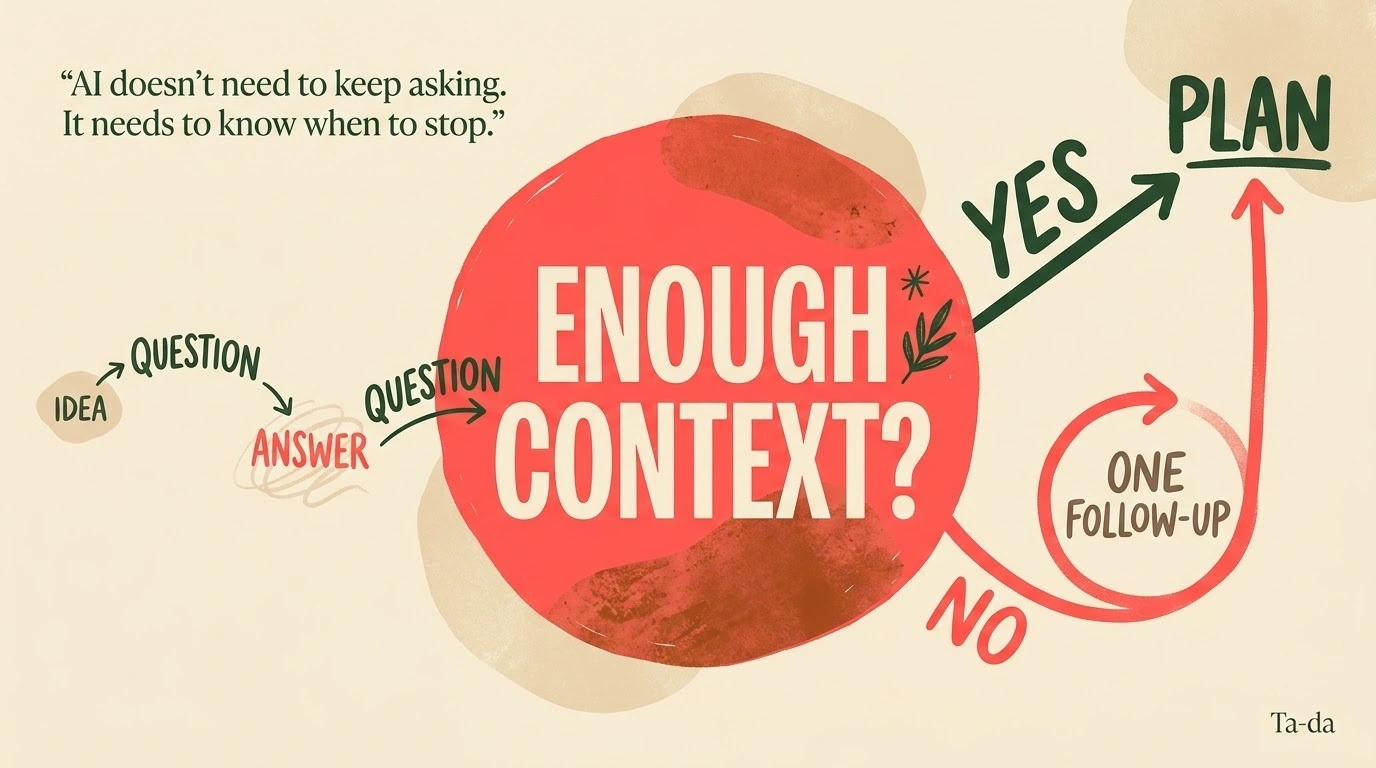
The AI needs to know when to stop asking questions.
This article looks at how I approached that problem, how I balanced AI decision-making with deterministic application logic, and what I learned about building a small agentic AI application without adding unnecessary complexity.
1. Why Endless AI Questioning Destroys UX
Traditional software usually makes every input explicit.
A form asks for a name, a date, a location, or a budget because the developer has already decided that those fields are required.
AI applications are different.
A language model can identify information that might be useful, but that does not mean the user should be asked for every possible detail.
There are three problems with endless questioning.
Cognitive overload
Users usually start with an idea, not a specification.
Someone might say:
“I want to plan a quiet anniversary evening with good food and a sunset.”
That is enough to start a useful planning process.
If the application immediately asks ten follow-up questions, the creative momentum disappears.
More API usage
Every additional interaction means another model request and more context being processed.
That increases latency and can increase token usage and API costs.
For a small application, unnecessary model calls are also an avoidable engineering problem.
Analysis paralysis
The longer someone spends answering questions, the more likely they are to wonder whether they are doing too much work just to use the product.
The goal of Ta-da is not to collect the perfect specification.
The goal is to turn an imperfect idea into a useful plan.
2. Designing the One-Follow-Up Rule
The core decision in Ta-da was simple:
Allow the AI to ask questions, but don’t let it keep asking forever.
The workflow starts with a natural-language idea.
For example:
“I want to surprise my wife for our anniversary. She likes quiet places, good food and sunsets.”
The AI evaluates that idea and determines what information is missing.
Depending on the request, it might need things such as:
- Location
- Budget
- Preferred experience
- Timing
- Important preferences
Instead of opening an unlimited conversation, Ta-da gives the AI a limited opportunity to collect the most important missing information.
The simplified workflow is:
Initial Idea → Understand Goal → Identify Missing Information → Ask Questions → Evaluate Context → Generate Plan
If additional information is genuinely important, the application allows one follow-up.
After that, the workflow moves forward.
This creates a useful balance:
AI gets enough freedom to understand the request.
The application prevents the conversation from becoming endless.
3. Why One Follow-Up Is Enough
More questions do not automatically produce a better result.
In fact, there is a point where additional questions produce diminishing returns.
Suppose the user has already provided:
- The occasion
- The location
- A reasonable budget
- Their preferred experience
- Important preferences
At that point, asking about every minor detail is probably unnecessary.
A good planning system should be able to work with incomplete information.
That means the model needs to make reasonable assumptions when the missing detail is not critical.
This is an important distinction.
The goal is not:
“Collect every possible piece of information.”
The goal is:
“Collect enough information to produce a useful result.”
That difference is at the heart of Ta-da’s user experience.
4. AI Agent Decision Making: Flexibility vs. Application Control
One of the biggest lessons from building Ta-da was that AI should not control everything.
My approach is simple:
Use AI for decisions. Use code for boundaries.
The AI is responsible for things that benefit from language understanding and contextual judgment.
What the AI decides
The model can:
- Understand the user’s intent
- Interpret the emotional tone of the request
- Identify missing information
- Decide what questions are useful
- Evaluate whether the available context is sufficient
- Shape the final personalized plan
What the application controls
The application is responsible for:
- Managing the workflow
- Limiting follow-up questions
- Managing UI state
- Validating responses
- Deciding when the questioning phase ends
- Handling invalid or unexpected model responses
This separation is important because language models are probabilistic.
Your application does not have to be.
The model can make flexible decisions inside a workflow that remains predictable.
5. Structured JSON Makes the AI Easier to Control
Another important engineering decision was avoiding free-form model output for the internal workflow.
If the model simply returns a block of Markdown, the frontend has to interpret that response and figure out what it means.
That becomes fragile as the application grows.
Instead, Ta-da uses structured responses for the different stages of the workflow.
For example, a question-generation response can contain the information the UI actually needs:
- Whether more information is required
- The questions to display
- The current stage of the workflow
The final planning response follows its own expected structure.
This creates a clean boundary:
Gemini → Structured JSON → Application Validation → React UI
The frontend does not need to understand the model’s reasoning process.
It only needs a predictable response structure that it can render.
6. Handling Incomplete or Ambiguous Answers
Real users do not always answer questions neatly.
Someone might respond:
“Whatever works best.”
Or they might provide a long paragraph containing several useful details mixed with unrelated information.
The application needs to handle this without creating another endless conversation.
This is where the AI is useful.
Rather than requiring every field to be explicitly completed, the model can interpret the information that is available and work with reasonable assumptions.
For example, if the user does not specify a particular type of cuisine, the system does not necessarily need to stop and ask.
The missing detail may simply not be important enough.
That leads to another useful principle:
Not every missing detail is a missing requirement.
An AI application needs to distinguish between information that is essential and information that is merely nice to have.
7. Engineering Around API Quotas and Failures
During development, I also ran into another reality of building with AI APIs: quotas.
While testing Ta-da with Gemini 2.5 Flash, I hit a 429 RESOURCE_EXHAUSTED response after exceeding the available free-tier daily request allowance.
That experience reinforced an important lesson.
AI API failures are not theoretical. They are part of the engineering environment.
For development, I added a developer-controlled mock mode:
DEBUG_MOCK_AI=true
When enabled, Ta-da bypasses the live Gemini calls and returns controlled mock responses.
This makes it possible to test the complete UI workflow without consuming additional model requests.
It is important to distinguish this from an automatic production fallback.
The mock mode is a development and testing mechanism. It does not pretend that an external AI service can never fail.
For a production version, I would add more explicit handling for:
- Rate limits
- Retries
- Timeouts
- Provider failures
- User-friendly error states
- Model fallback or routing where appropriate
The lesson is simple:
Your application should assume that the AI service can fail.
8. Why I Didn’t Use LangChain or LangGraph
When building an agentic AI application, it is tempting to immediately reach for an orchestration framework.
LangChain and LangGraph are useful tools, particularly when workflows become more complex.
But Ta-da did not need that complexity in its current form.
The workflow is relatively small:
Question → Answer → Evaluate → Optional Follow-Up → Plan
I could implement that directly using TypeScript and Next.js.
That gave me a few advantages:
- The workflow is easy to understand
- State transitions are explicit
- Model calls are easy to trace
- There is less abstraction to debug
- The application has fewer moving parts
This is not an argument against agent frameworks.
If Ta-da eventually needs persistent memory, multiple specialized agents, long-running workflows, tool orchestration, or more complex state transitions, a framework could make sense.
For the current application, simpler was better.
9. What I Would Change for Production
The current version of Ta-da is intentionally lightweight.
If I were taking it further, I would add capabilities that move the application from planning into execution.
Real-world tool calling
The AI could use external tools to verify things such as:
- Restaurant hours
- Locations
- Activities
- Availability
- Travel distance
- Real-time information
That would allow the final plan to be grounded in current data instead of relying only on model knowledge.
Persistent planning
The current application keeps the planning session lightweight and temporary.
A production version could introduce persistent storage so users could:
- Save plans
- Edit plans
- Return later
- Share plans
- Collaborate on a surprise
That could eventually be backed by PostgreSQL or Supabase.
More specialized decision-making
Another possibility would be separating responsibilities between specialized components.
For example:
Creative Planner → Budget Reviewer → Practicality Check → Final Plan
That would make the system more sophisticated, but I would only introduce that complexity when the product actually needs it.
10. What Building Ta-da Taught Me
The biggest lesson was that building an AI application is not just about choosing a powerful model.
It is about deciding where the model should have freedom and where the application should have control.
Ta-da gives Gemini room to understand natural language, identify missing information, ask useful questions, and shape a personalized result.
But the application controls the boundaries around those decisions.
That is what makes the experience feel less like an open-ended chatbot and more like a product.
The model can be flexible.
The product should still be predictable.
Conclusion
Building an AI agent that knows when to stop asking questions requires a different mindset from building a traditional chatbot.
You do not need to collect every possible detail.
You need to collect enough information to produce a useful outcome.
For Ta-da, that meant creating a one-follow-up rule, separating AI decisions from application controls, using structured JSON, validating model responses, and designing development safeguards around AI API limits.
The result is a focused agentic AI workflow that starts with a rough idea and moves toward a personalized plan without forcing the user through an endless conversation.
You can try the current version of Ta-da here: Try Ta-da
The project is also available on GitHub: View the Ta-da source code
If you’re building a SaaS product, AI application, or have an idea you’d like to turn into a working product, Contact Me to discuss it.