Building the Agentic AI Workflow Behind Ta-da
When people talk about building AI applications today, the conversation usually revolves around prompt engineering or choosing the right model. But after building Ta-da, I realized that the hardest and most interesting part wasn’t figuring out how to prompt Google Gemini 2.5 Flash.
The real engineering challenge was deciding where the AI should have freedom to make decisions and where the application code needed to take control.
This article breaks down how I designed the agentic AI workflow behind Ta-da using Next.js, Gemini 2.5 Flash, structured JSON, and application-level guardrails. If you haven’t seen Ta-da yet, you can try the live application and see the workflow in action.
What Makes Ta-da Agentic?
In traditional software, execution paths are mostly deterministic. If a user clicks button A, the application performs action B. In a standard LLM chat interface, the opposite can happen: the model receives a prompt and produces an open-ended response.
An agentic AI workflow sits somewhere between these two approaches. The application gives the AI a specific goal and allows it to make decisions about how to move toward that goal, while the surrounding software controls the boundaries in which those decisions can happen.
Ta-da is agentic because it doesn’t simply answer a question. It starts with a user’s rough idea, determines what information is missing, asks targeted questions, evaluates whether it has enough context, and then generates a personalized plan.
The important distinction is that the AI isn’t being given complete control of the application. It is making decisions inside a workflow designed by the application.
How to Build an Agentic AI Workflow: The Ta-da Approach
The entire Ta-da experience follows a simple sequence. The user starts with a natural-language idea, such as “A birthday picnic near the lake.” The application sends that idea to the AI, which interprets the goal and determines what information would be useful before creating the plan.
The model can identify missing details such as location, budget, timing, preferences, or the type of experience the user wants. It then generates targeted questions rather than presenting the user with a long, predefined questionnaire.
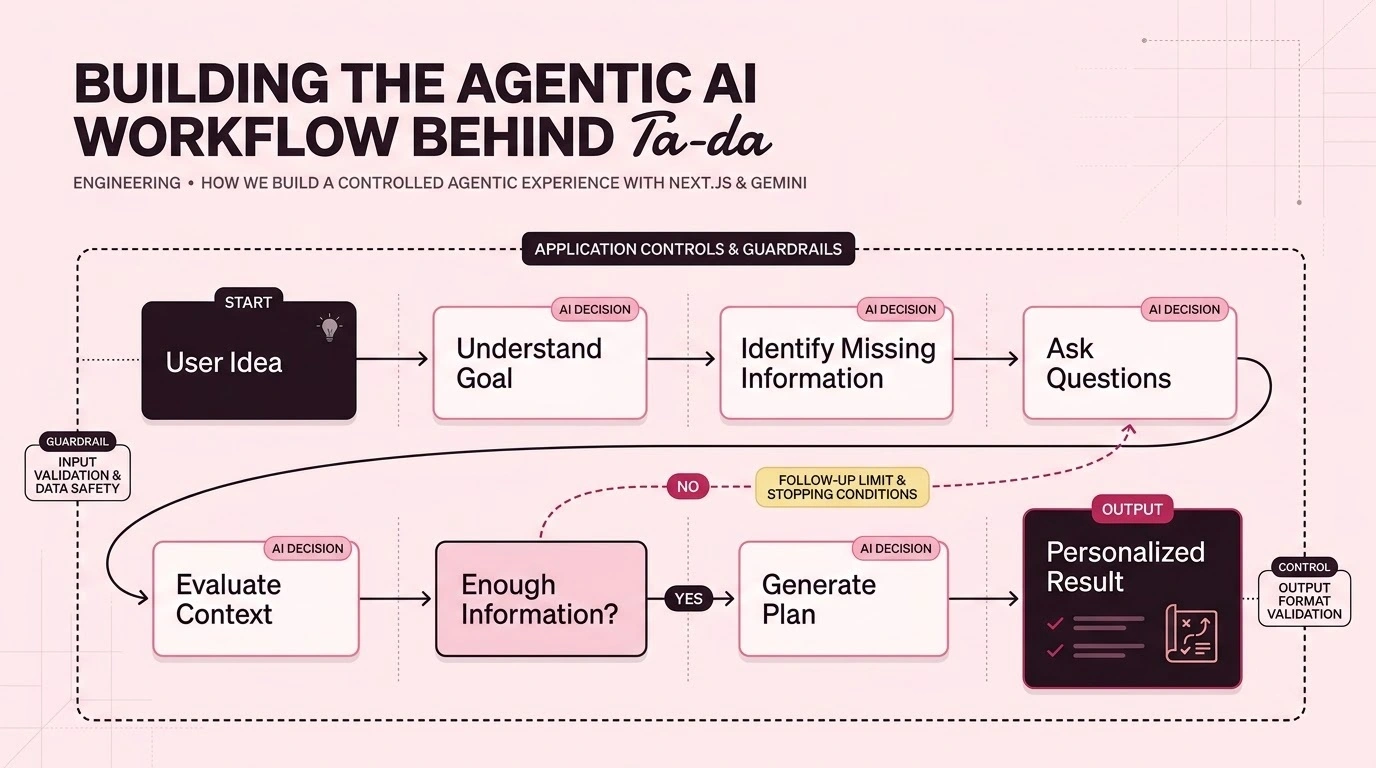
As the user answers those questions, the application sends the accumulated context back through the workflow. The AI evaluates whether it has enough information to create a useful plan. If something important is still missing, the application allows a limited follow-up. Once the available context is sufficient, the workflow moves to final plan generation.
Conceptually, the workflow looks like this:
User Idea
    ↓
Understand the Goal
    ↓
Identify Missing Information
    ↓
Ask Questions
    ↓
Collect Answers
    ↓
Evaluate Context
    ↓
Enough Information?
   ↙        ↘
 No          Yes
 ↓            ↓
Follow-up   Generate Plan
              ↓
           Final Result
This is where the agentic part becomes useful. The application isn’t following a fixed list of questions. The AI determines what is relevant based on the user’s actual idea.
Letting the AI Decide What to Ask
Instead of hardcoding a static questionnaire or giving Gemini complete conversational freedom, I delegated a few specific decisions to the model.
The first is context analysis. Gemini looks at the user’s idea and the information already available, then determines what important details are missing.
The second is dynamic questioning. Rather than asking every user the same questions, the model generates questions based on the particular situation. Someone planning a quiet anniversary dinner may need very different information from someone planning an outdoor birthday surprise.
The third is synthesizing the information. The user’s answers may contain several separate preferences and constraints. The model combines that information when generating the final plan so the result feels connected to the original idea.
This is an important part of building an agentic AI application. The model isn’t simply generating a response to a prompt. It is making decisions about what information is needed to move the workflow forward.
The One-Follow-Up Rule
One of the easiest mistakes when building an AI-powered experience is assuming that more questions automatically produce a better result.
They don’t.
If an AI is allowed to keep asking questions, it can easily become overly detailed. It may want to know about dietary restrictions, preferred music, backup locations, parking, weather preferences, transportation, and dozens of other details.
That might improve the theoretical quality of the result, but it makes the product frustrating to use.
For Ta-da, I introduced a strict one-follow-up rule. The initial question round should gather the important information. If the AI determines that something significant is still missing, the application allows one additional follow-up before moving toward the plan.
This creates an important product constraint: the AI needs to work with the information it has rather than endlessly interrogating the user.
It also keeps the number of model calls controlled, which matters when working with API quotas and usage limits.
AI Decisions vs. Application Controls
One of the biggest lessons from building Ta-da was the importance of separating AI decisions from application decisions.
The AI is responsible for things such as understanding the user’s intent, identifying missing information, generating relevant questions, deciding whether the available context is sufficient, and shaping the final plan around the user’s preferences.
The application is responsible for things such as managing the workflow, limiting the number of follow-ups, controlling when questioning stops, validating the data returned by the model, managing the UI state, and deciding what happens when the model cannot provide a valid response.
This separation is important because an LLM is probabilistic. Application code doesn’t need to become probabilistic just because it uses an LLM.
The goal is to let the model handle the parts where language understanding and contextual decisions are useful, while keeping the important product rules deterministic.
Why I Used Structured JSON
Another important decision was to avoid relying on free-form model output for the application’s internal workflow.
If an AI returns a large block of Markdown and the frontend has to interpret that text to determine whether it contains questions, answers, or a final plan, the application becomes difficult to maintain.
Ta-da instead uses structured responses for the AI-driven parts of the workflow. The model returns data in a predefined structure that the application can validate and use.
When the model generates questions, the application expects question data in a known format. When the final plan is generated, the application expects structured information that can be rendered by the React interface.
This creates a clean boundary between the AI and the frontend. The AI is responsible for generating the content, while the application is responsible for deciding how that content is displayed.
It also makes the workflow easier to debug because the application can detect an invalid response instead of allowing unexpected model output to flow directly into the UI.
The Agentic AI Workflow Architecture
The architecture behind Ta-da is intentionally simple.
React / Next.js Frontend
          ↓
Next.js API Routes
          ↓
Google Gemini 2.5 Flash
          ↓
Structured JSON Response
          ↓
Application Validation
          ↓
React UI
The browser does not communicate directly with Gemini. The model API call is handled on the server side so that the API key isn’t exposed to the client.
The frontend manages the user experience and temporary planning state, while the API layer handles communication with Gemini and returns the structured response needed by the interface.
For the first version of Ta-da, I intentionally kept the architecture small. There is no database, no separate orchestration platform, and no heavy agent framework sitting between the application and the model.
That makes the workflow easier to understand and, more importantly, easier to change.
Handling Model Failures and Quotas
Working with external AI APIs also means dealing with things that have nothing to do with the quality of the application itself.
For example, during development I hit the Gemini free-tier request limit. The API returned a 429 RESOURCE_EXHAUSTED response even though the application itself was functioning correctly.
This is an important distinction when building AI products. A model API can be temporarily unavailable, rate-limited, or out of quota. The application needs to treat those situations as an expected part of working with an external dependency rather than assuming every failure is an application bug.
For development and UI testing, I also added a mock AI mode to Ta-da. This allows me to test the complete question and planning workflow without making real Gemini requests.
That became particularly useful while developing the application because I could continue working on the interface and workflow even when the Gemini quota was unavailable.
Why I Didn’t Use LangChain or LangGraph
Many developers building agentic workflows immediately reach for frameworks such as LangChain or LangGraph. They are useful tools, particularly when an application requires more complex orchestration, persistent state, multiple tools, or long-running workflows.
For Ta-da, I intentionally didn’t introduce them.
The current workflow is small enough that I can implement the orchestration directly in TypeScript and Next.js. The application already knows the states it needs to manage, the number of follow-ups it allows, and when the workflow should move to final plan generation.
Adding another orchestration layer at this stage would make the architecture more complicated without solving a problem I currently have.
That doesn’t mean these frameworks aren’t useful. If Ta-da eventually becomes a much more sophisticated agent with persistent memory, multiple tools, long-running tasks, or multiple specialized agents, the decision could change.
For the current version, keeping the workflow explicit gives me more control and makes the system easier to understand.
What I Would Add Next
The current workflow is intentionally focused, but there are several directions I could take it in the future.
The first would be tool calling. Instead of simply generating suggestions, Ta-da could use external APIs to check real venues, activities, opening hours, locations, and availability.
Another possibility would be adding more structured planning capabilities. The application could calculate budgets, compare options, or adjust the plan based on real-world constraints.
A more advanced version could also introduce specialized agents. One model could focus on the creative experience while another could review the budget or validate the practical details.
At that point, tools such as persistent memory, model routing, or an orchestration framework could become useful. But I don’t think every AI application needs those components from day one.
What I Learned
The biggest lesson from building Ta-da is that AI is a component of the architecture, not the architecture itself.
The model is very good at understanding natural language, identifying context, generating questions, and creating personalized content. But the application still needs to define the rules around that intelligence.
The most useful AI products aren’t necessarily the ones that give the model the most freedom. They are often the ones that give the model enough freedom to do something useful while keeping the overall experience predictable.
For Ta-da, that meant allowing Gemini to decide what information was missing and what questions would be useful, while letting the application control the workflow, limits, validation, and user experience.
That balance is what turns an LLM integration into an actual application.
Conclusion
Building Ta-da taught me that creating an agentic AI application is less about giving an AI unlimited autonomy and more about designing the right boundaries around its decision-making.
Gemini provides the language understanding and reasoning needed to interpret a user’s idea, identify missing information, ask questions, and create a plan. Next.js and TypeScript provide the structure around those capabilities, making the workflow predictable and usable.
The result is a focused agentic AI workflow rather than simply another chatbot.
You can try Ta-da to see the workflow yourself, or explore the Ta-da source code on GitHub.
If you’re building a SaaS product, experimenting with AI, or have an idea you’d like to turn into a working product, you can also get in touch with me.