Building Ta-da: An Agentic AI Surprise Planner
Planning a memorable surprise sounds simple until you actually have to do it.
A birthday, anniversary, proposal, date night, or even a simple “just because” surprise can involve a lot of decisions. Where should you go? What should you do? How much should you spend? What does the person actually enjoy? How do you make the whole thing feel connected instead of just putting together a list of activities?
That is what led me to build Ta-da, an agentic AI surprise planner.
The idea was simple. Instead of asking someone to fill out a long form or have an endless conversation with an AI, let them start with whatever is already in their head. Ta-da then figures out what information is missing, asks a few useful questions, and creates a personalized surprise plan.
In this article, I’ll explain what Ta-da is, why I built it, and how I approached the overall architecture.
Why I Built Ta-da
The idea came from a common problem.
You want to do something special for someone, but you don’t necessarily know where to start.
You might know something like:
“I want to surprise my wife for our anniversary. She loves quiet places, good food and sunsets.”
That is already enough to describe the feeling you want.
But turning that sentence into an actual plan requires much more information.
You may need to think about:
- Location
- Budget
- Timing
- Preferences
- The type of experience
- Things the person does not like
- How one part of the evening should lead into the next
Most planning tools start by asking you for all of this information.
I wanted to try the opposite approach.
Start with the idea and let the application figure out what it needs.
What Is an Agentic AI Surprise Planner?
Ta-da is a focused AI application for planning surprises and memorable moments.
The user starts by describing what they want in their own words.
For example:
“I want to surprise my wife for our 10th anniversary. She loves quiet places, good food and sunsets.”
The user can also select the type of occasion, such as:
- Birthday
- Anniversary
- Date night
- Proposal
- Just because
The occasion is useful context, but it does not define the entire request. The description is still the main input.
From there, Ta-da takes over the information-gathering process.
It looks at what the user has already provided and decides what information would actually help create the plan.
The goal is not to collect every possible detail.
The goal is to collect enough useful information to create a good plan.
The Experience I Wanted
I wanted the interaction to feel closer to talking to someone who understands what you are trying to do.
The basic idea became:
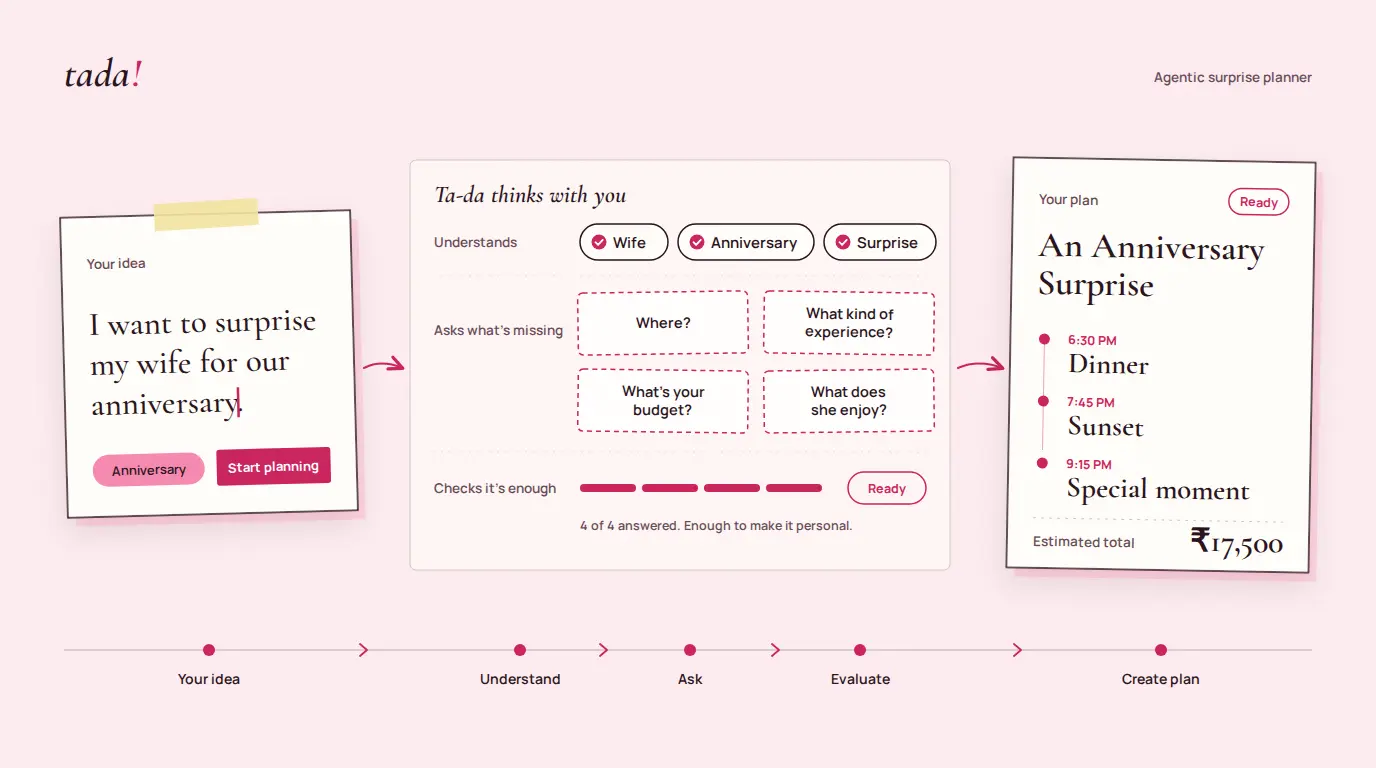
Tell → Ask → Understand → Plan
Tell
The user starts with whatever they have.
There is no need to know the exact location, budget, schedule, or activities at this point.
Just describe the surprise.
Ask
Ta-da looks at the idea and determines what information is missing.
Instead of presenting a large questionnaire, it asks targeted questions.
The questions can change depending on what the user has already said.
Understand
After the user answers, Ta-da checks whether there is enough context to create a useful plan.
If something important is still missing, it can ask a limited follow-up question.
If there is enough information, it stops asking.
Plan
Once there is enough context, Ta-da creates the final surprise plan.
The result is structured around a timeline rather than being another long AI response.
The user gets something they can actually use, print, or share.
Why I Didn’t Want to Build Another AI Surprise Planner Chatbot
When building an AI application, the easiest pattern is often a chatbot.
User types something.
The AI responds.
User asks another question.
The AI responds again.
And the conversation continues.
That works well for many use cases, but I did not think it was the right experience for Ta-da.
The user does not really want to have a long conversation about planning a surprise.
They want to get the surprise planned.
A general chatbot also puts a lot of responsibility on the user. The user has to know what information to provide, what questions to ask, and when there is enough information to move forward.
Ta-da moves that responsibility into the application.
The user provides the goal.
The AI helps determine what is needed to reach that goal.
That difference is what pushed me toward an agentic AI workflow instead of a traditional chat interface.
Designing the Ta-da Workflow
At a high level, the workflow looks like this:
User Idea
    ↓
Understand the Goal
    ↓
Determine Missing Information
    ↓
Ask Questions
    ↓
Collect Answers
    ↓
Evaluate Context
    ↓
Enough Information?
   ↙        ↘
 Yes        No
  ↓          ↓
Plan      Follow-up
             ↓
            Plan
There are several important decisions happening here.
First, Ta-da needs to understand the initial idea.
Second, it needs to determine what information is missing.
Third, it needs to ask questions that are actually useful for this particular request.
After the answers come back, it evaluates the context again.
This is different from simply sending every user message to an LLM and displaying the response.
The application has a defined goal and a defined workflow.
The AI operates inside that workflow.
What Makes It Agentic?
I don’t consider Ta-da a fully autonomous AI agent, and I don’t want to describe it that way.
It is better described as an agentic AI planning workflow.
The reason is that the AI is making decisions within a defined goal.
For example, the application does not contain one fixed questionnaire that every user must complete.
Instead, Gemini can determine that one user needs information about budget while another user may need information about location or preferences.
The AI can also decide that it already has enough information and that another question is not necessary.
That decision-making is an important part of the workflow.
The application then takes the result and moves the user to the next stage.
So there is a clear separation:
The AI decides:
- What information appears to be missing
- Which questions are useful
- Whether enough context is available
- How the final plan should reflect the user’s idea
The application controls:
- The overall workflow
- The number of follow-up questions
- When questioning stops
- The data structure
- The UI state
- How the final result is displayed
This gives the AI flexibility without giving it unlimited control over the application.
Keeping the AI Inside the Rails
One of the biggest design decisions in Ta-da was deciding how much freedom to give the AI.
An LLM can always come up with another question.
It can ask for another preference, another detail, another constraint, or another piece of context.
That is not necessarily useful.
For Ta-da, I wanted the opposite.
The application has clear boundaries, while the AI has flexibility inside those boundaries.
For example, the AI can decide what questions are relevant, but the application controls how far the questioning process can go.
This makes the workflow more predictable for the user and also helps control unnecessary model calls.
I think this is an important pattern when building AI applications:
Give the AI room to make useful decisions, but don’t make the AI responsible for controlling the entire product.
The Technical Architecture
Ta-da is intentionally built with a relatively small stack.
The main pieces are:
- Next.js for the application and API routes
- TypeScript for the application code
- Google Gemini 2.5 Flash for the AI workflow
- Tailwind CSS for the UI
- Vercel for deployment
At a high level, the architecture looks like this:
Next.js UI
     ↓
Next.js API Routes
     ↓
Google Gemini 2.5 Flash
     ↓
Structured JSON
     ↓
Next.js UI
The browser does not communicate directly with Gemini.
The AI requests go through the application’s server-side API routes, keeping the Gemini API key on the server.
The AI responses are also structured so that the application can work with predictable data instead of trying to interpret a large block of generated text.
This is important because the final result is a UI, not a chat transcript.
Designing the Experience Around the User
The AI is only one part of Ta-da.
I also wanted the interface itself to feel simple.
The first screen starts with one question:
“I want to surprise someone with…”
That is intentionally open.
The user does not need to understand how the AI works or what information the system needs.
They simply describe the idea.
Once the questions begin, Ta-da shows them one at a time rather than presenting a long form.
After enough information has been collected, the experience moves into a ready state before generating the final plan.
The final result is presented as a timeline with clear milestones and descriptions.
There are also options to print the plan or copy it for sharing.
The idea throughout the product is to keep the user focused on the surprise rather than the mechanics of planning it.
One Important Decision: Don’t Keep Asking
This turned out to be one of the more important decisions in the project.
An AI can keep asking questions forever in the name of personalization.
But more questions do not automatically mean a better result.
At some point, the information collected is good enough to create something useful.
So Ta-da uses a limited questioning process.
The AI can determine what information is important, but it does not get an unlimited number of opportunities to keep questioning the user.
If minor details are missing, the system can make reasonable assumptions instead of turning the experience into a survey.
This also has an engineering benefit.
Every additional AI request costs time and potentially consumes API quota.
Keeping the workflow focused improves both the user experience and the efficiency of the application.
What I Learned Building Ta-da
Building Ta-da reinforced a few things for me.
AI needs product boundaries
Giving an LLM more freedom does not always produce a better product.
The application needs to define what the AI is trying to accomplish and where it needs to stop.
The user should not have to understand the AI
A good AI application should hide much of the complexity.
The user should not need to know about prompts, models, tokens, API calls, or workflow states.
They should simply be able to describe what they want.
The outcome matters more than the conversation
Ta-da is not trying to create the most interesting AI conversation.
It is trying to create a useful surprise plan.
That distinction influenced many of the product and architecture decisions.
Agentic does not have to mean autonomous
For me, Ta-da is a good example of a more controlled approach to agentic AI.
The AI makes useful decisions, but the application still owns the workflow.
That makes the system easier to reason about and gives the user a more predictable experience.
What’s Next
The current version of Ta-da focuses on the planning experience.
There are several directions it could take in the future.
For example:
- Researching real venues and activities
- Checking availability
- More detailed budget calculations
- Personalized recommendations
- Connecting multiple tools to complete parts of the plan
- Allowing Ta-da to take actions on the user’s behalf
Those would move the system further toward an autonomous agent.
For now, I wanted to keep the first version focused on one thing:
Can an AI understand a goal, figure out what information it needs, and turn that information into a useful plan?
That is the part I wanted to explore.
Conclusion
Ta-da started with a simple question:
What if you could tell an AI what kind of surprise you wanted without having to figure out all the details first?
That question led me to build an agentic AI surprise planner with a workflow where the user provides the idea, the AI determines what is missing, the application keeps the process under control, and the final result is a structured surprise plan.
It is a relatively small application, but it gave me a useful opportunity to explore how agentic AI can be applied to a focused product rather than simply putting a chatbot into an existing interface.
You can try Ta-da here: Try Ta-da
The source code is available on GitHub: View the Ta-da repository
Have a project or AI idea you’d like to discuss?
If you’re building a SaaS product, exploring AI, or have an idea you’d like to turn into a working product, feel free to Contact Me.