
Production RAG Chunking: How to Process PDF Documents for Retrieval
Introduction
One of the most important steps in building a Retrieval-Augmented Generation (RAG) system is preparing documents for retrieval.
Imagine uploading a quarterly financial report in PDF format. The document contains paragraphs, tables, charts, graphs, images, headings, and multiple sections.
How do we make all this information searchable by an AI application?
Simply extracting the text and splitting it into chunks of 500 tokens is not enough. We need to preserve the document’s structure, maintain relationships between different content types, and ensure that the information retrieved later contains enough context to answer questions accurately.
This is where Production RAG Chunking becomes important.
In this article, we’ll explore seven commonly used chunking methods and then walk through how a production RAG ingestion pipeline processes a PDF, from upload to vector database storage.
1. Understanding the Seven Commonly Used Chunking Methods
Before implementing a production pipeline, let’s understand the different chunking approaches and where each one is useful.
1. Fixed-Size Chunking
Divides text into chunks of a predefined size, usually measured in tokens or characters, with an optional overlap between consecutive chunks.
Where is it used?
- Simple text documents.
- Plain-text knowledge bases.
- Documents with minimal formatting.
2. Recursive Chunking
Splits documents using a hierarchy of separators, such as paragraphs, line breaks, sentences, and finally individual characters, until the desired chunk size is reached.
Where is it used?
- General-purpose document processing.
- Technical documentation.
- Long articles and reports.
3. Sentence-Based Chunking
Splits documents into individual sentences or groups of sentences while maintaining natural language boundaries.
Where is it used?
- FAQs.
- Short-form documents.
- Conversational knowledge bases.
4. Semantic Chunking
Groups sentences based on their meaning rather than simply their length. Semantically similar sentences stay together, while significant changes in topic can create new chunks.
Where is it used?
- Research papers.
- Financial reports.
- Long documents containing multiple topics.
5. Structure-Aware / Schema-Aware Chunking
Uses the document’s structure, such as headings, sections, paragraphs, tables, and other layout elements, to determine how content should be divided.
Where is it used?
- Financial statements.
- Quarterly reports.
- Technical manuals.
- Legal documents.
6. Parent-Child Chunking
Creates smaller child chunks for precise retrieval while retaining links to larger parent sections that provide additional context.
Where is it used?
- Large PDF documents.
- Enterprise knowledge bases.
- Documents with long sections and subsections.
7. Contextual-Enriched Chunking
Adds relevant contextual information, such as document title, section heading, reporting period, or surrounding content, to a chunk before generating its embedding.
Where is it used?
- Financial and research documents.
- Multi-document RAG systems.
- Enterprise document search.
These methods are not mutually exclusive. A production RAG system can combine several of them depending on the document type and retrieval requirements.
2. How Production RAG Chunking Works
Now let’s look at the actual implementation.
We’ll use our quarterly financial report as an example.
The objective is to process the PDF, identify different content types, apply appropriate extraction and chunking strategies, generate embeddings, and store everything for retrieval.
Step 1: PDF Upload and Document Extraction
The first step is receiving the PDF and extracting its contents.
However, we should not treat the PDF as a plain-text file.
We need to identify:
- Text and paragraphs.
- Headings and subheadings.
- Tables and their rows.
- Images and charts.
- Page numbers and document layout.
Libraries such as PyMuPDF, Docling, and Unstructured can help extract document content and layout information.
For example, using PyMuPDF:
import fitz

def extract_pdf_pages(file_path):
    document = fitz.open(file_path)

    pages = []

    for page_number, page in enumerate(document):
        pages.append({
            "page_number": page_number + 1,
            "text": page.get_text("text"),
            "images": page.get_images(full=True)
        })

    return pages
This gives us an initial extraction of page text and image references.
Important: This is only an initial extraction. Tables, reading order, chart meaning, and complex layouts require additional processing.
Step 2: Document Structure and Hierarchy Detection
Once the content is extracted, we need to understand how the document is organized.
For example:
Quarterly Financial Report
│
├── 1. Executive Summary
│   ├── Business Overview
│   └── Key Highlights
│
├── 2. Financial Performance
│   ├── Revenue
│   ├── Operating Expenses
│   └── Profitability
│
├── 3. Financial Statements
│   ├── Income Statement
│   ├── Balance Sheet
│   └── Cash Flow
│
└── 4. Future Outlook
Why does this matter?
Suppose someone asks:
“What was the company’s revenue in Q3?”
If the retrieved chunk contains only $18 million, it is not particularly useful.
But if the chunk retains its context:
Document: Quarterly Financial Report
Section: Financial Performance
Subsection: Revenue
Period: Q3 2025

Revenue: $18 million
The information becomes much more meaningful.
This is why preserving document hierarchy is important.
Step 3: Identify Content Types
Now we identify what type of content each extracted block represents.
For example:
def classify_content(block):
    if block.get("table"):
        return "table"

    if block.get("image"):
        return "image"

    if block.get("heading"):
        return "heading"

    return "text"
This is a simplified example. A real document parser should provide layout classifications rather than relying only on these flags.
Our processing pipeline now has different routes:
| Content | Processing approach |
|---|---|
| Normal text | Recursive chunking |
| Sentences | Sentence-based chunking |
| Tables | Table-aware extraction |
| Charts and graphs | OCR, vision models and data extraction |
| Images | Image extraction and caption generation |
| Headings | Preserve hierarchy and metadata |
This is where a production system differs from a basic text-splitting implementation.
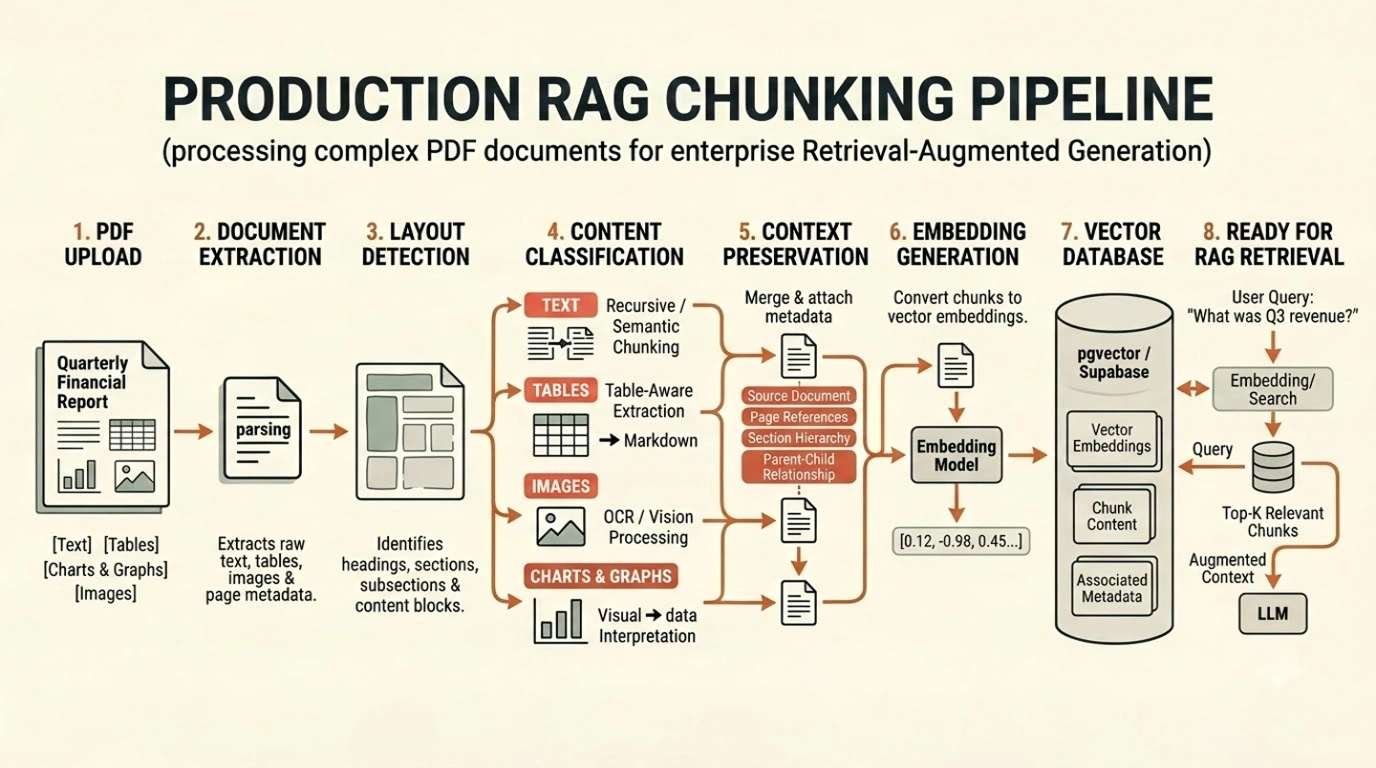
Step 4: Apply Appropriate Chunking Strategies
We now process each content type using an appropriate strategy.
A. Normal text: Recursive chunking
For ordinary paragraphs, recursive chunking is a good starting point.
from langchain_text_splitters import RecursiveCharacterTextSplitter

splitter = RecursiveCharacterTextSplitter(
    chunk_size=1000,
    chunk_overlap=150
)

chunks = splitter.split_text(document_text)
This attempts to preserve natural text boundaries while keeping chunks within the configured size.
B. Tables: Table-aware chunking
Tables should retain their headers and relationships between rows and columns.
For example:
Section: Financial Performance
Table: Quarterly Revenue

Quarter | Revenue
Q1 2025 | $10M
Q2 2025 | $14M
Q3 2025 | $18M
We can store the table as structured data and create searchable text representations.
For large tables, we can split by row groups while repeating the necessary headers and context.
C. Images and charts: Vision-based processing
An image cannot be meaningfully indexed by simply extracting its filename.
We can use OCR or a vision model to understand its contents.
For example:
Image: Revenue Growth Chart

Description:
The company's revenue increased from
$10M in Q1 2025 to $18M in Q3 2025.
The generated description can be embedded as searchable text, while retaining a reference to the original image.
For charts containing important numerical information, we should extract the underlying data where possible instead of relying only on a visual description.
Step 5: Preserve Parent-Child Relationships
At this stage, we have smaller chunks.
However, smaller chunks sometimes lack sufficient context.
Consider a document with the following structure:
Parent:
Financial Performance

    Child 1:
    Revenue increased by 20%.

    Child 2:
    Operating expenses increased by 8%.

    Child 3:
    Net profit increased by 12%.
We can embed and retrieve the smaller child chunks while retaining references to their parent section.
When a child chunk is retrieved, the application can fetch its parent section to provide additional context to the LLM.
This helps balance precise retrieval with sufficient contextual information.
Step 6: Generate Embeddings
Once our chunks are ready, we convert their searchable text representations into vector embeddings.
An embedding model transforms text into numerical vectors that represent semantic meaning.
For example:
from sentence_transformers import SentenceTransformer

model = SentenceTransformer(
    "all-MiniLM-L6-v2"
)

texts = [
    chunk["content"]
    for chunk in processed_chunks
]

embeddings = model.encode(texts)
In this example, we’re using a local Sentence Transformers model.
In production, the embedding model should be selected based on retrieval quality, language requirements, document types, cost, and infrastructure.
Step 7: Store Chunks in a Vector Database
Finally, we store the generated embeddings along with the corresponding text and metadata.
For example:
record = {
    "content": chunk["content"],
    "embedding": embedding.tolist(),
    "metadata": {
        "document_id": document_id,
        "page_number": chunk["page_number"],
        "section": chunk["section"],
        "content_type": chunk["content_type"],
        "parent_id": chunk.get("parent_id")
    }
}
We can store these records in PostgreSQL with the pgvector extension, Supabase, Pinecone, or another vector database.
The metadata helps us filter, trace, and retrieve the original document context.
At this point, our document is ready for semantic retrieval.
3. Putting It All Together: The Production Pipeline
Let’s summarize the complete ingestion process.
             PDF Upload
                 |
                 v
        Document Extraction
                 |
                 v
       Layout & Hierarchy
            Detection
                 |
                 v
        Content Classification
                 |
        +--------+--------+
        |        |        |
        v        v        v
       Text    Tables   Images/Charts
        |        |        |
        v        v        v
     Recursive  Table    OCR / Vision
     /Semantic  Parsing  Extraction
        |        |        |
        +--------+--------+
                 |
                 v
       Context Preservation
       & Parent-Child Mapping
                 |
                 v
        Embedding Generation
                 |
                 v
          Vector Database
                 |
                 v
          Ready for RAG
One important implementation detail: not every document needs all seven chunking strategies. The ingestion pipeline should choose strategies based on the actual document structure and content.
For example, a plain-text document may only require recursive chunking, while a complex financial report may require structure-aware processing, table extraction, vision models, and parent-child relationships.
4. Conclusion
Production RAG chunking is not simply about splitting a document into smaller pieces.
It is about understanding the document, preserving its structure, identifying different content types, selecting the right extraction and chunking methods, and retaining enough context for accurate retrieval.
A good chunking strategy directly influences the quality of information retrieved by a RAG system.
The real goal is not to create smaller chunks. It is to create meaningful, searchable pieces of information that an AI application can retrieve and understand correctly.
Explore the Implementation
Want to see RAG in action? Check out my Fin-Report-RAG project on GitHub, which demonstrates an end-to-end RAG application for querying quarterly financial reports using Next.js, FastAPI, Supabase pgvector, and Google Gemini.
For more practical insights into AI engineering, RAG, SaaS architecture, and product development, explore the CodedByAZM Tech Blog.