MCP Explained for Beginners: How AI Connects to Your Tools
AI assistants can answer questions, summarize information, and help you make decisions. But what happens when you want an AI assistant to check your calendar, find an available meeting slot, or create an appointment?
The AI needs a way to interact with external applications.
This is where the Model Context Protocol (MCP) comes in. MCP provides a standardized way for AI applications to connect with external tools, data, and services.
In this guide to MCP for beginners, we’ll explain how MCP works, introduce its main components, and explore when to use it instead of building direct API integrations. We’ll follow a simple calendar assistant example throughout the article.
Key Takeaways
- MCP standardizes how AI applications communicate with external tools and data sources.
- MCP hosts, clients, and servers work together to enable these connections.
- Tools, resources, and prompts provide different capabilities.
- MCP complements existing APIs rather than replacing them.
- Security, authentication, and permissions remain essential.
1. Why Do AI Applications Need MCP?
Imagine asking an AI assistant:
“Check my calendar for tomorrow and find a suitable time for a meeting.”
An AI model can understand your request, but it cannot automatically access your calendar just because you asked. The application needs a way to retrieve your events and potentially create an appointment.
Developers can connect applications directly to services such as Google Calendar, contact management systems, and video conferencing platforms. However, every integration introduces its own requirements and maintenance work.
The Model Context Protocol addresses this challenge by providing a common way for AI applications to communicate with external capabilities.
Instead of designing an entirely different communication interface for every AI application, developers can expose functionality through MCP servers that compatible applications can use.
2. What Is the Model Context Protocol (MCP)?
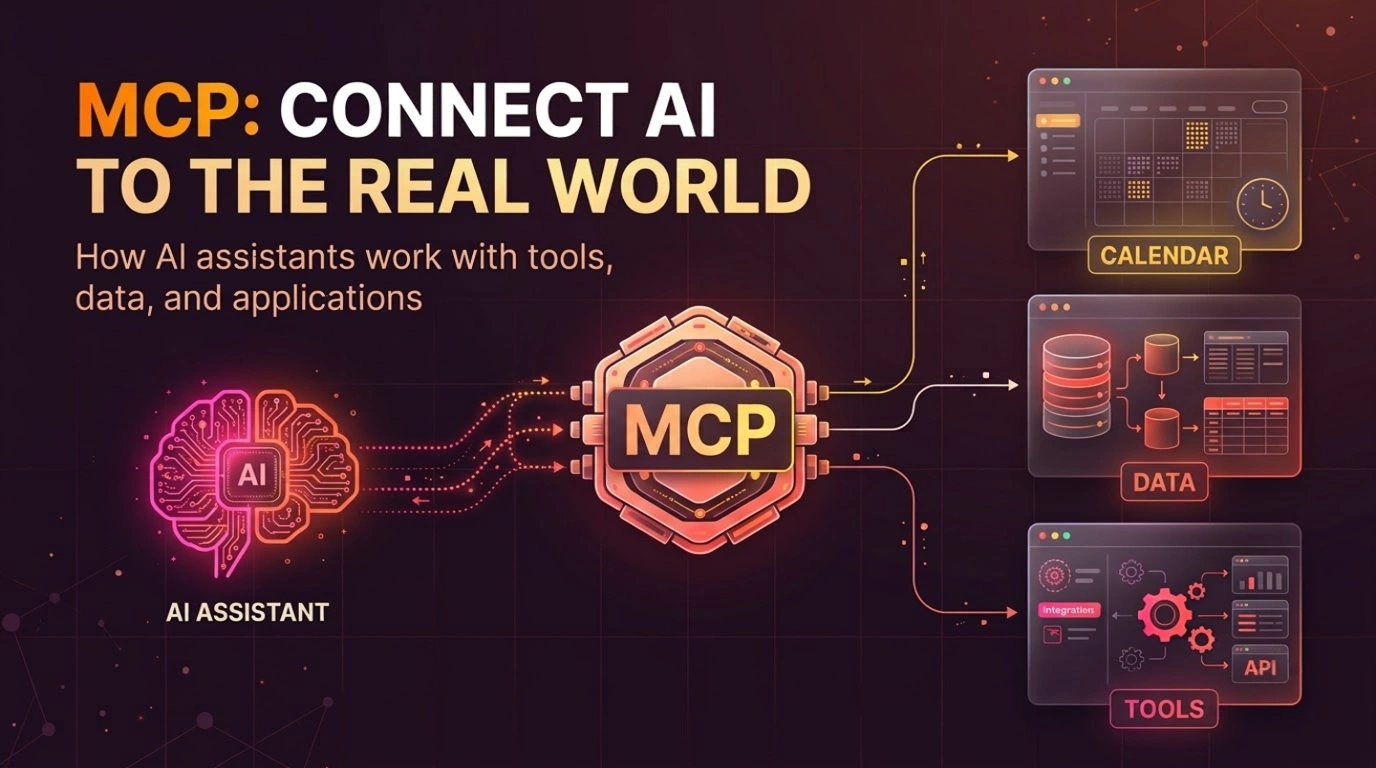
The Model Context Protocol (MCP) is an open protocol that standardizes how AI applications interact with external systems and capabilities.
Think of MCP as a common language that allows an AI application to communicate with tools and services.
For our calendar assistant, a developer could expose calendar functionality through an MCP server. A compatible AI application could then communicate with that server to retrieve events or request an available meeting slot.
Three components make this possible:
- MCP host: The AI application you interact with.
- MCP client: The component within the host that communicates with an MCP server.
- MCP server: The component that exposes tools, resources, and prompts.
A simple analogy helps: the host is the app you chat with, the client is its communication link, and the server connects to the external capability.
MCP does not replace the AI model or the calendar’s API. It provides a standardized communication layer between the AI application and the capabilities exposed by an MCP server.
3. How Does MCP Work?
Let’s return to our calendar example.
You ask the assistant:
“Find a free hour tomorrow afternoon and create a meeting with Sarah.”
Assuming the necessary permissions and meeting details are available, the process might work as follows.
- You make a request. The AI assistant receives your instruction and determines what information it needs.
- The application identifies the required capabilities. It may need to retrieve calendar events and find an available time slot.
- The MCP client communicates with the MCP server. The client sends requests using the MCP protocol.
- The server interacts with the calendar service. It may call the calendar’s API to retrieve availability or create an event.
- The result returns to the AI application. The assistant uses the response to explain the available slot or report the outcome of the action.
If essential information is missing, the assistant may ask a follow-up question. Creating the meeting may also require confirmation, depending on the application’s design and permissions.
4. MCP Tools, Resources, and Prompts Explained
MCP servers can expose three main types of capabilities: tools, resources, and prompts. Although they work together, they serve different purposes.
4.1 Tools: Actions the AI Can Request
Tools allow an AI application to invoke functions exposed by an MCP server.
Our calendar server might provide tools such as:
list_eventsto retrieve calendar events.find_available_slotsto identify possible meeting times.create_eventto create an appointment.
When you ask the assistant to schedule a meeting, it can request the relevant tool and use the returned result.
Tools can also change external systems. Developers should therefore validate requests and apply appropriate permissions and safeguards before allowing actions such as creating, editing, or deleting appointments.
4.2 Resources: Information the Application Can Access
Resources provide data or context that an MCP client can retrieve.
For example, a calendar server might expose information about upcoming events or calendar contents as resources. The AI application can use this information to understand the user’s schedule.
Resources focus on making information available, rather than directly performing an action.
Note: MCP servers do not have to expose all calendar information as resources. Their available capabilities depend on how the server is designed.
4.3 Prompts: Reusable Instructions
Prompts are reusable prompt templates that an MCP server can offer to a compatible client.
For example, our calendar assistant could offer a template for reviewing the week’s schedule. It might instruct the AI to summarize appointments, identify busy periods, and highlight potential scheduling conflicts.
The template helps structure the AI’s instructions without requiring the user or application to write them from scratch every time.
Prompts do not automatically perform calendar operations. They provide reusable instructions for the AI application.
Quick comparison
| Capability | Purpose | Calendar example |
|---|---|---|
| Tools | Invoke actions or functions | Create a meeting |
| Resources | Retrieve data or context | Access calendar information |
| Prompts | Provide reusable instructions | Summarize the week’s schedule |
Not every MCP server exposes all three capabilities. The available functionality depends on its implementation.
5. MCP vs. Direct APIs: When Should You Use Which?
If your application can already connect to Google Calendar through its API, why introduce MCP?
The answer depends on your application’s requirements.
A direct API integration connects your application to a particular service. MCP provides a standardized way for AI applications to communicate with capabilities exposed by MCP servers.
| Direct API integration | MCP |
|---|---|
| Your application calls a service’s API directly. | Your application communicates with an MCP server. |
| You build an integration around your application’s requirements. | You can expose capabilities through a standard interface for compatible AI applications. |
| Often simpler for a focused integration. | Useful when capabilities need to be reused across compatible AI applications. |
MCP does not eliminate APIs. An MCP server can use an existing calendar API internally while exposing selected functionality through MCP.
When should you use a direct API?
A direct API integration may be the better choice when:
- Your application needs only a small, fixed set of operations.
- You are building a conventional workflow rather than an AI-driven assistant.
- MCP would introduce additional complexity without providing meaningful reuse.
For example, a simple booking form that creates calendar events may not need MCP.
When does MCP make sense?
MCP may be useful when:
- An AI assistant needs to work with several external services.
- You want to make capabilities available to multiple compatible AI applications.
- You are building an AI-powered product that needs a standardized interface for accessing tools and data.
For example, a scheduling assistant that works with calendars, contacts, and conferencing services could benefit from MCP.
The important point is that MCP is not automatically better than a direct API integration. Choose it when standardization and reuse justify the additional component.
6. Security Considerations When Using MCP
Connecting an AI application to external services introduces security considerations, particularly when tools can modify data or perform actions.
Imagine our calendar assistant can create, edit, and delete appointments. Poorly configured access could expose private information or allow unintended changes.
Developers should consider the following safeguards.
Authentication and authorization: Ensure the server has only the access it needs, and restrict which accounts and operations it can use.
User confirmation: Require approval for sensitive or consequential actions when appropriate. For example, the assistant might propose a meeting and ask for confirmation before sending invitations.
Input validation: Validate meeting times, attendee identities, and other inputs before passing requests to external services.
Server trust: Connect only to MCP servers you trust and understand. Depending on their configuration, servers may have access to sensitive data or powerful tools.
Data privacy: Avoid exposing unnecessary personal information in tool responses, logs, or prompts.
MCP standardizes communication, but it does not automatically make an integration secure. Security depends on how the host, client, server, and external services are configured and operated.
7. How Can You Get Started With MCP?
If you’re exploring MCP for beginners, a good first step is to connect an existing MCP server to a compatible AI application.
You could start with a calendar integration and inspect the capabilities it exposes. Try a read-only operation, such as retrieving upcoming events, before exploring actions that modify your calendar.
Once you understand how requests and responses work, you can build a small MCP server of your own.
Use a test environment where possible, configure appropriate permissions, and add write operations only after understanding the safeguards they require.
For the official protocol documentation and implementation guides, visit the Model Context Protocol website.
Conclusion: MCP Makes AI Integrations More Standardized
The Model Context Protocol provides a standardized way for AI applications to communicate with external capabilities through MCP servers.
Understanding hosts, clients, servers, tools, resources, and prompts helps developers evaluate how MCP fits into an application architecture.
MCP does not replace APIs, and not every AI project needs it. Its value comes from making integrations more consistent and reusable across compatible AI applications.
With the right integration, our calendar assistant can move beyond answering questions to retrieving availability and helping schedule meetings, subject to the permissions and safeguards in place.
For developers and product teams building AI-powered SaaS products, MCP is one approach worth understanding when designing applications that interact with external services.
Let’s Connect
At CodedByAzm, we work on SaaS engineering, AI-powered applications, and product development.
Whether you’re exploring an AI integration, planning a new product, or improving an existing application, get in touch through our Contact Us page to discuss your project.